How to restyle a video and keep the motion and sound
You can now shoot a scene with anything (your phone, a webcam, whatever’s in reach) and turn it into professional film.
Mitte’s Restyle Video workflow repaints every frame of your footage in the style you describe. The motion stays. The sound stays. Only the look changes. So the acting, the timing, the blocking you captured survive, and the phone-video look gets replaced with cinematography.
Here’s how.
Step by step
- Simply, go to mitte.ai/preset/restyle-video.
- Drop your video
- describe the new style, and choose resolution.
That’s all.
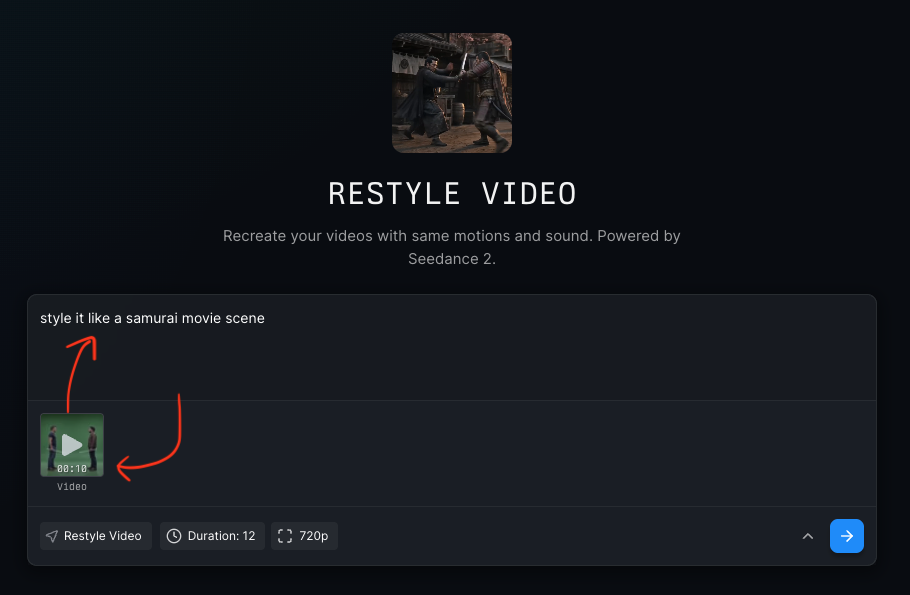
Example prompts:
“restyle like a hollywood grade samurai film” “restyle like a pixar cartoon film” “restyle like shot with iPhone 12”
Generate
Once you’re done, simply, hit the Generate button. Mitte will first create artifacts; extracted first frame, sound, and depth map. After that, Mitte will first restyle the first frame of your input video, then create a final video from all the artifacts.
How it works
Under the hood, Restyle Video runs on Seedance 2. The preset chains a few operations:
- Depth map. It reads your video and builds a depth map, so the restyle respects the geometry of your scene instead of smearing over it. You can create depth maps from your videos using the Depth Anything Video model.
- First frame. It pulls the first frame and restyles that single image in your described look. This becomes the visual anchor for everything that follows.
- Audio. It strips the audio out and sets it aside, untouched.
- Reassembly. Seedance 2 propagates the restyled frame across the full clip, guided by the depth map, and the original audio goes back on top.
You can run each of these steps manually in mitte if you want control over the middle (restyle the first frame yourself, swap the audio, whatever the shot needs). Or you can let the preset run the whole chain in one go.
👉 Shoot something on your phone and restyle it at mitte.ai/preset/restyle-video.